# Setting the Concurrency Tag
The `Octopus.Task.ConcurrencyTag` system variable gives us finer control over how tasks run concurrently in Octopus. Like the variable that allows you to bypass the deployment mutex, this variable should be handled with care.
Octopus uses this variable to determine which tasks can run concurrently. For non-tenanted deployments, it has the value `#{Octopus.Project.Id}/#{Octopus.Environment.Id}`. Tenanted deployments use the value `#{Octopus.Deployment.Tenant.Id}/#{Octopus.Project.Id}/#{Octopus.Environment.Id}`.
If we change the value for a tenanted deployment to `#{Octopus.Project.Id}/#{Octopus.Environment.Id}`, the tenanted deployment tasks will run sequentially instead of concurrently.
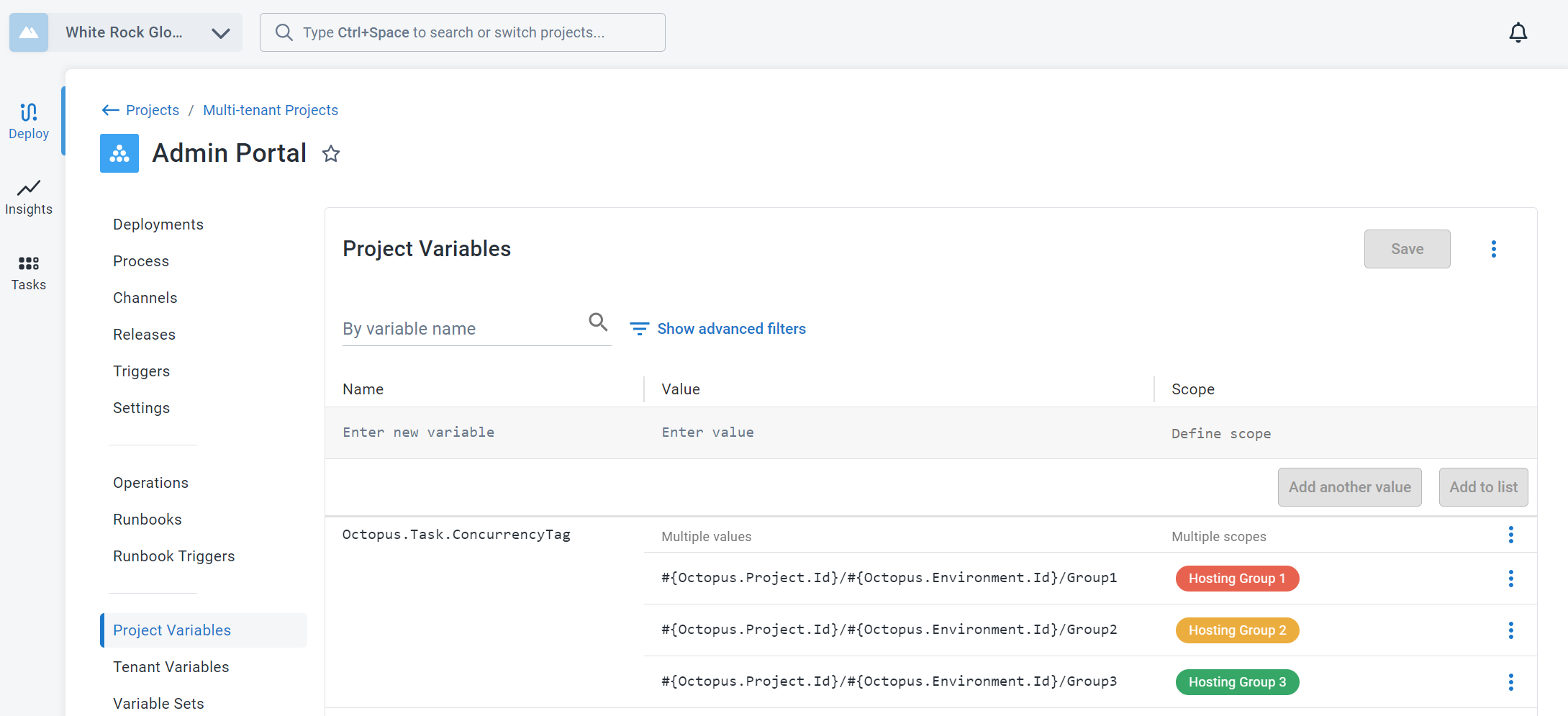
In this scenario, we want to run one task per hosting group concurrently. We can do that by scoping different values to the Hosting Group tenant tags.
:::figure
:::
Now the deployments for each tenant in the same hosting group will run sequentially.
Let's see how that changes the deployment tasks.
Previous Next