# Azure account variables
[Azure accounts](/docs/infrastructure/accounts/azure/) can be referenced in a project through a project [variable](/docs/projects/variables) of the type **Azure account**.
The [Azure PowerShell](/docs/deployments/azure/running-azure-powershell) step will allow you to bind the account to an **Azure account** variable, using the [binding syntax](/docs/projects/variables/#use-variables-in-step-definitions). By using an variable for the account, you can have different accounts used across different environments or regions using [scoping](/docs/projects/variables/#use-variables-in-step-definitions).
:::figure
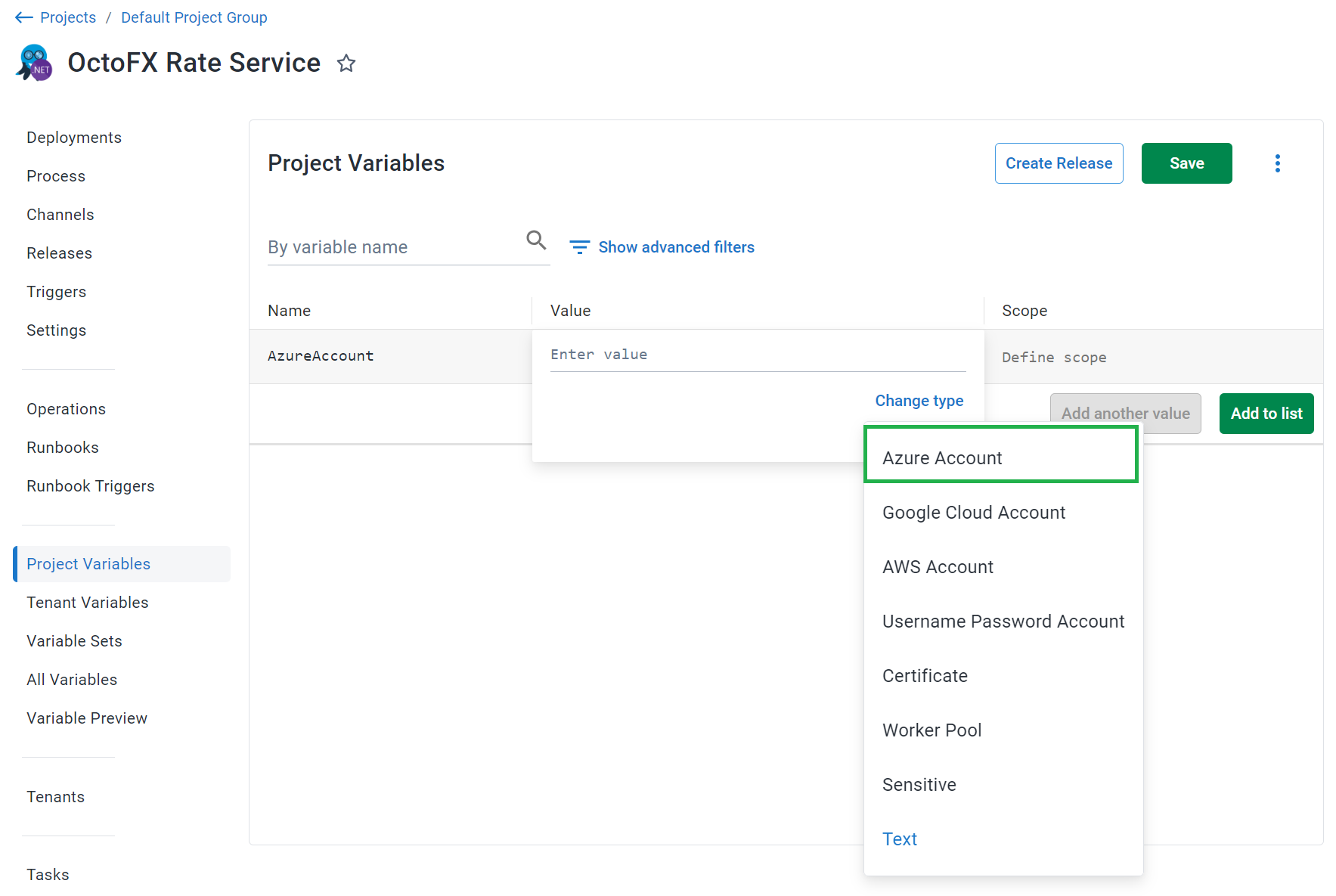
:::
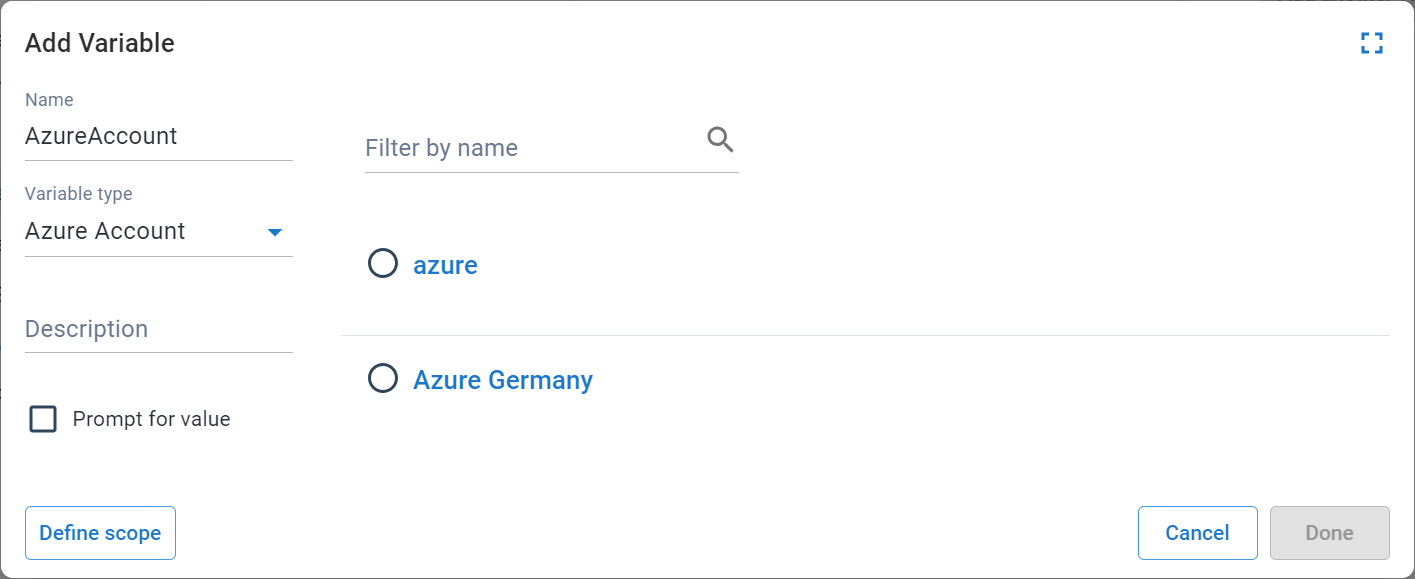
The **Add Variable** window is then displayed and lists all the Azure accounts.
Select the account that was created in the previous step to assign it to the variable.
:::figure
:::
## Azure account variable properties
The Azure account Variable also exposes the following properties that you can reference in a PowerShell script:
### Service Principal
| Name and description | Example |
| -------------------- | ------------------------|
| **`SubscriptionNumber`**
The Azure Subscription Id | cd21dc34-73dc-4c7d-bd86-041284e0bc45 |
| **`Client`**
The Azure Application Id | 57dfa713-f4c1-4b15-b21d-d14ff7941f7c |
| **`Password`**
The Client Secret for the Azure Application.
Only set if **Use a Service Principal** is selected | correct horse battery staple |
| **`OpenIdConnect.Jwt`**
The JWT identity token for the current task
Only set if **Use OpenID Connect** is selected | *(dynamically generated token)* |
| **`TenantId`**
The Azure Active Directory Tenant Id | 2a681dca-3230-4e01-abcb-b1fd225c0982 |
| **`AzureEnvironment`**
The Azure environment | AzureCloud, AzureGermanCloud, AzureChinaCloud, AzureUSGovernment |
| **`ResourceManagementEndpointBaseUri`**
Only set if explicitly set in the Account settings | https://management.microsoftazure.de/ |
| **`ActiveDirectoryEndpointBaseUri`**
Only set if explicitly set in the Account settings | https://login.microsoftonline.de/ |
| **`Audience`**
Federated credentials audience
Only set if **Use OpenID Connect** is selected | api://AzureADTokenExchange |
### Management certificate
| Name and description | Example|
| -------------------- | ------------------------|
| **`SubscriptionNumber`**
The Azure Subscription Id | cd21dc34-73dc-4c7d-bd86-041284e0bc45 |
| **`CertificateThumbprint`**
The thumbprint of the certificate | |
| **`ServiceManagementEndpointBaseUri`**
| https://management.core.cloudapi.de |
| **`ServiceManagementEndpointSuffix`**
| core.cloudapi.de |
| **`AzureEnvironment`**
The Azure environment | AzureCloud, AzureGermanCloud, AzureChinaCloud, AzureUSGovernment |
### Accessing the properties in a script
Each of the above properties can be referenced in any of the supported scripting languages such as PowerShell and Bash.
PowerShell
```powershell
# For an account with a variable name of 'azure account'
# Using $OctopusParameters
Write-Host 'AzureAccount.Id=' $OctopusParameters["azure account"]
Write-Host 'AzureAccount.Client=' $OctopusParameters["azure account.Client"]
# Directly as a variable
Write-Host 'AzureAccount.Id=' #{Azure account.Id}
Write-Host 'AzureAccount.Client='#{Azure account.Client}
# For an OpenId Connect account
Write-Host 'AzureAccount.OpenIdConnect.Jwt='#{Azure account.OpenIdConnect.Jwt}
Write-Host 'AzureAccount.Audience='#{Azure account.Audience}
```
Bash
```bash
# For an account with a variable name of 'azure account'
id=$(get_octopusvariable "azure account")
client=$(get_octopusvariable "azure account.Client")
echo "Azure Account Id is: $id"
echo "Azure Account Client is: $client"
# For an OpenID Connect account
jwt=$(get_octopusvariable "azure account.OpenIdConnect.Jwt")
audience=$(get_octopusvariable "azure account.Audience")
echo "Azure Account JWT is: $jwt"
echo "Azure Account OIDC Audience is: $audience"
```
## Learn more
- [Variable blog posts](https://octopus.com/blog/tag/variables/1)