# Artifactory Generic Feeds
:::div{.warning}
From version **Octopus 2024.1.4058** we support Artifactory Generic Repositories. This functionality is behind the `ArtifactoryGenericFeedFeatureToggle` feature toggle, to request this functionality early, please contact [support](https://octopus.com/support).
:::
:::div{.warning}
To use the Artifactory Generic Feeds feature you will need a PRO or higher license of Artifactory
:::
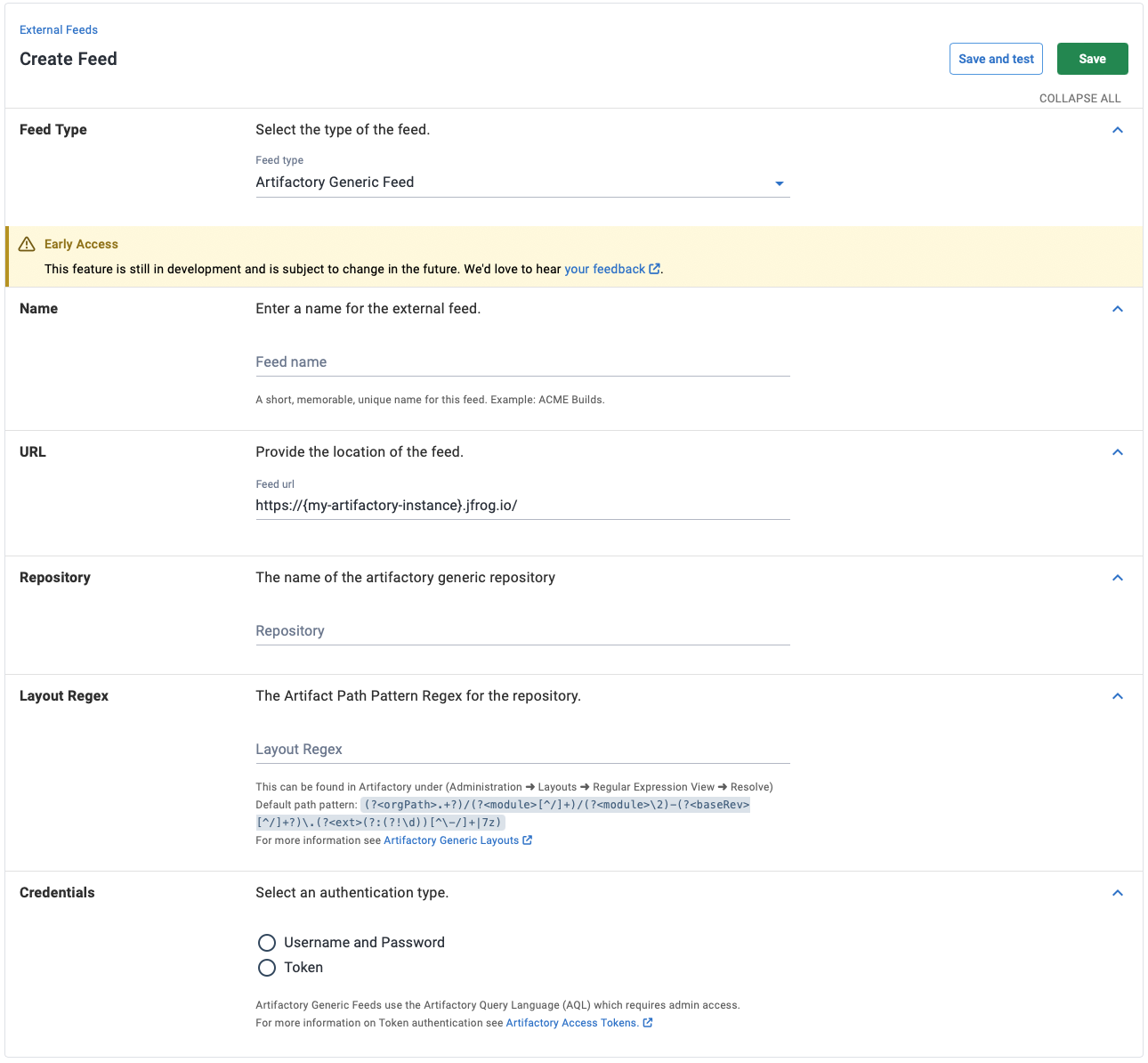
If you're using an Artifactory Generic Repository, you can create a feed in Octopus and use artifacts as part of your deployments. To create a feed go to **Deploy ➜ Manage ➜ External Feeds**. Select the **Add feed** button and selecting the _Artifactory Generic Repository_ feed type.
You will then need to provide a feed name, the Artifactory repository name, an [access token](https://oc.to/ArtifactoryAccessToken) and the repository [Artifact Path regex](https://jfrog.com/help/r/jfrog-artifactory-documentation/layout-configuration).
:::figure
:::
Artifactory generic feeds accommodate files of any type without requiring a specific file name structure. To handle this Artifactory supports [custom layouts](https://jfrog.com/help/r/jfrog-artifactory-documentation/layout-configuration).
Custom layouts produce a regex expression that the file path and name must match, enabling Artifactory to extract the file type, version and module. This customizable package structure does not match Octopus's expected [package versioning conventions](/docs/packaging-applications/create-packages/versioning) used in other feeds.
To handle this we depend on the Artifact Path Pattern regex expression available from Artifactory to be set on the feed in Octopus.
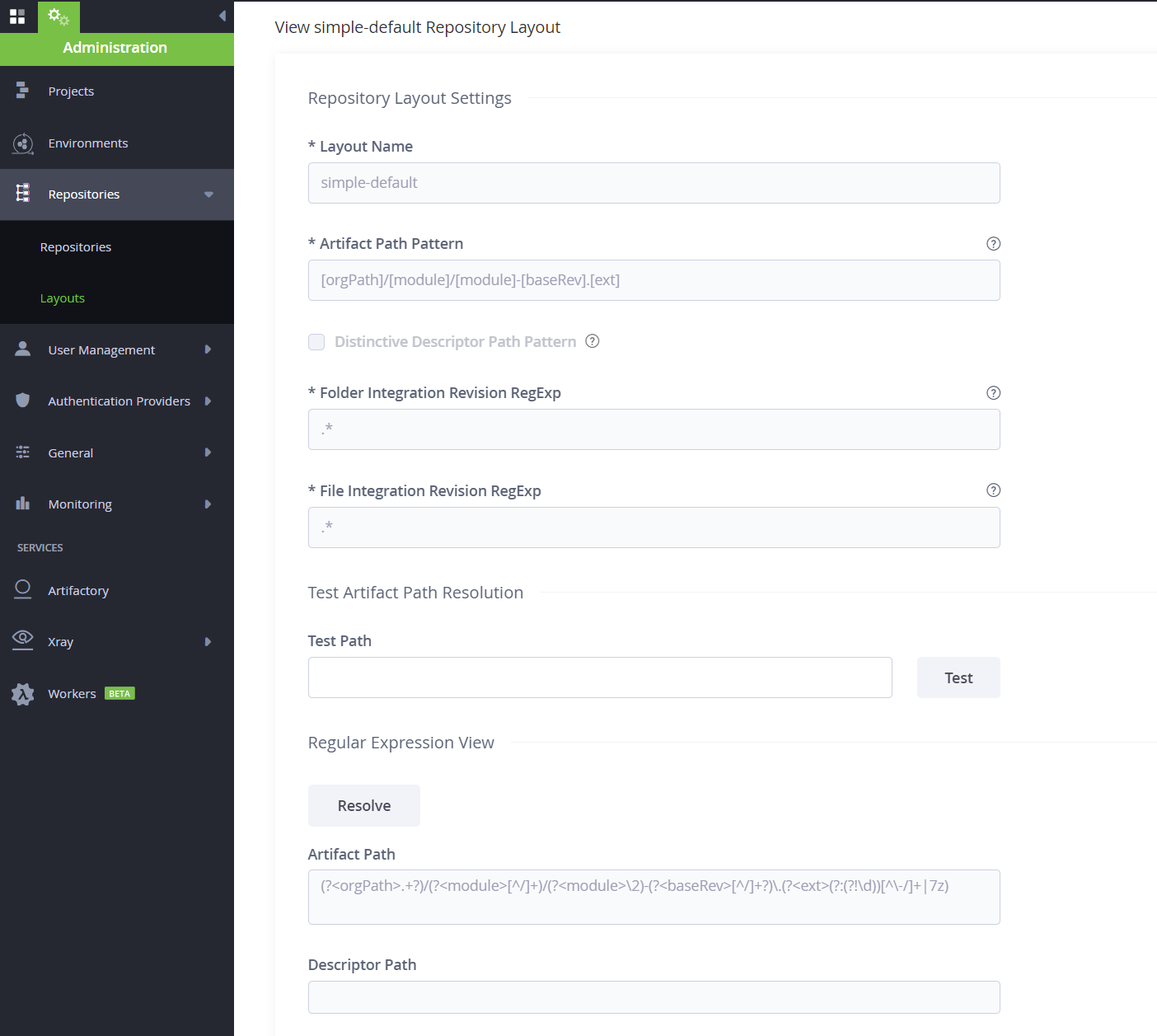
To find the _Artifact Path Pattern_ go to **Administration ➜ Layouts ➜ Regular Expression View ➜ Resolve** and copy the Artifact Path Regex expression. A new repository will use the default `simple-layout` generated by Artifactory, the regex for this layout is (?.+?)/(?[^/]+)/(?\2)-(?[^/]+?)\.(?(?:(?!\d))[^\-/]+|7z).
:::div{.warning}
Important: To ensure that Octopus can correctly interact with Artifactory generic feeds, the custom layout pattern in Artifactory must include specific naming components. The layout pattern must specify the artifact name format as `[module]-[baseRev].[ext]`. It's crucial that the `[module]` and `[baseRev]` components are present, and that `[baseRev]` conforms to Semantic Versioning.
For detailed guidance on configuring a custom layout that supports simple versioning, please refer to the following tutorials:
* [Creating a Simple Versioning Custom Layout in Artifactory](https://jfrog.com/help/r/jfrog-artifactory-documentation/configure-repository-layouts)
* [Modules and Path Patterns used by Repository Layouts](https://jfrog.com/help/r/jfrog-artifactory-documentation/modules-and-path-patterns-used-by-repository-layouts)
:::
:::figure
:::
The Octopus integration with Artifactory Generic Repositories depends on the artifacts matching the repository layout, specifically on the _module_ and _baseRev_ properties. An artifact can be tested whether it matches the layout regex by using the _Test Artifact Path Resolution_ in Artifactory. When artifacts match the layout pattern the [listing versions for a specific package](https://oc.to/ArtifactVersionSearch) endpoint will return a list of all available versions.
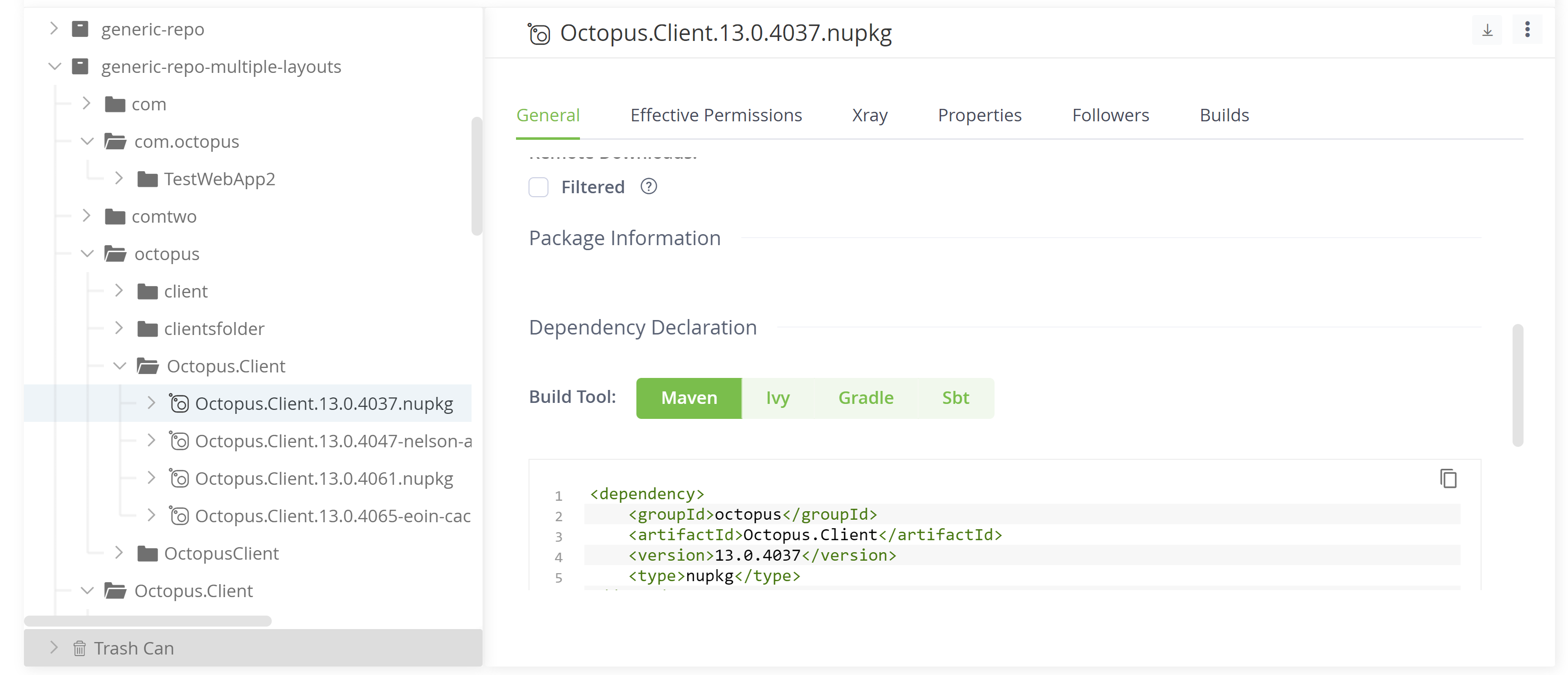
This also provides the package information when viewing an artifacts details in the Artifactory UI. If the package information properties (Dependency Declaration) are not visible in the Artifactory UI Octopus will not be able to list versions, or download these artifacts.
:::figure
:::
The regex layout in Artifactory is used to [list the versions of an artifact](https://oc.to/ArtifactVersionSearch). Searching and selecting a package uses the Artifactory Query Language to search within the repository, this does not depend on the layout.
:::div{.warning}
If a package has been found and selected but fetching versions fails when creating deployments this is likely due to the layout not matching the artifact within Artifactory.
:::
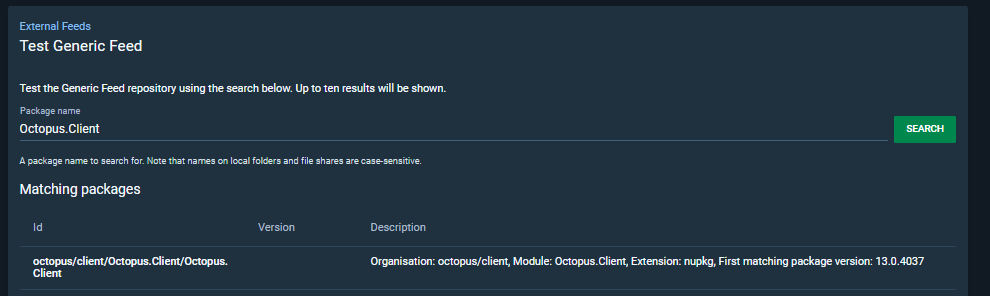
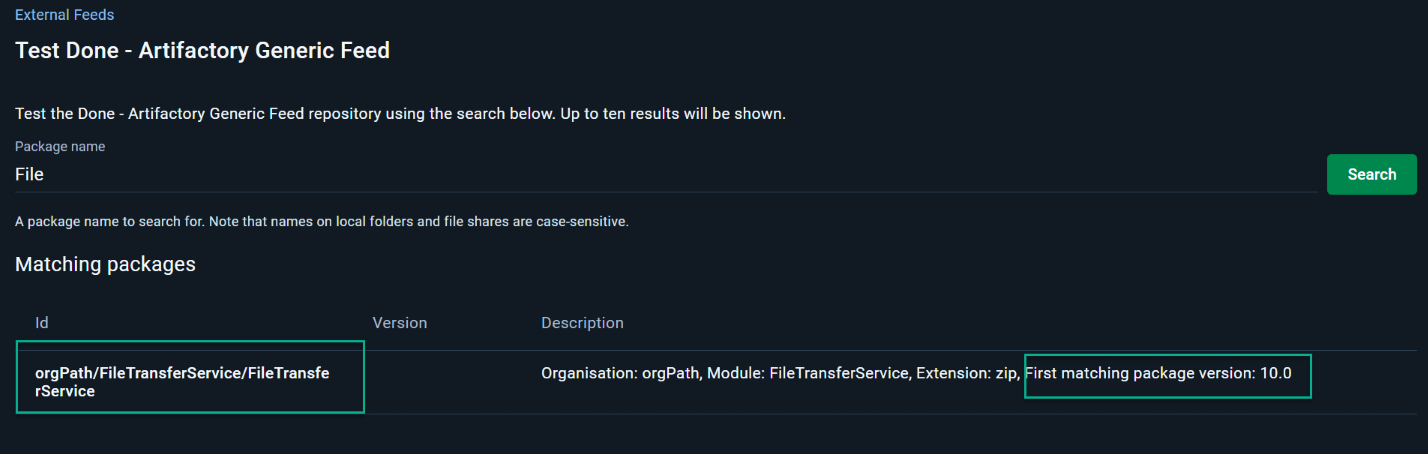
On the test page, you can search for packages, this will return the packageId expected by Octopus along with the artifact details. The expected packageId is `path/module` where the path is the folder structure to the artifact returned from the AQL query items.find(...) and the module is determined by the regex expression set on the feed within Octopus.
:::div{.warning}
The package search for the feed is case-sensitive, so you must match the package's case in the Package Name field exactly to find the package. A package name can be partially searched for, or the full package name and version can be searched for. For example, for a package called 'FileTransferService-10.0.zip,' you can search for 'File', 'FileTransferService', or 'FileTransferService-10.0.zip'.
:::
:::figure
:::
### Known limitations
- Due to a limitation in the Octo CLI, that has been deprecated, our TeamCity plugin does not support creating releases for projects that use Artifactory Generic Feeds
### Example Repository Layout
We see quite a few customers struggle with getting a generic feed layout to work in Octopus for a package ID and version search. To help with this, a basic example is included below:
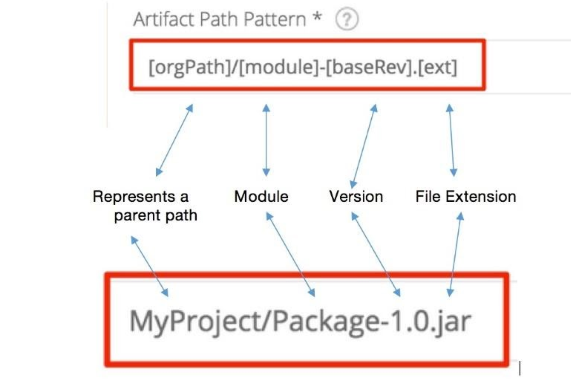
If you have a repository setup with the default `simple-layout` regex generated by Artifactory, (?.+?)/(?[^/]+)/(?\2)-(?[^/]+?)\.(?(?:(?!\d))[^\-/]+|7z), this translates to `[orgPath]/[module]/[module]-[baseRev].[ext]`
Using the picture below provided by Artifactory for an Artifact path pattern:
:::figure
:::
We can then break that down and add a repository file layout structure to it:
`[orgPath]` = OrgPath
`[module]` = FileTransferService
`[module]-[baseRev]` = FileTransferService-10.0
`.[ext]` = .zip
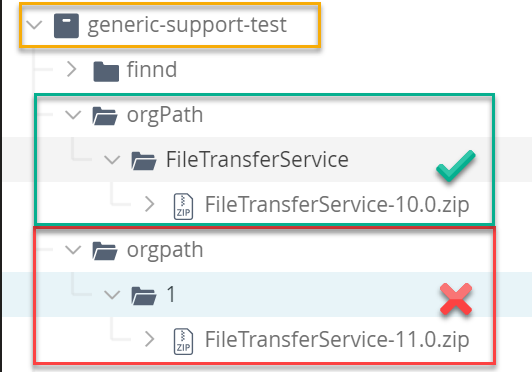
For this to work in an Octopus search, your artifactory generic feed has to be designed where:
- The module has to match the package name:
:::figure
:::
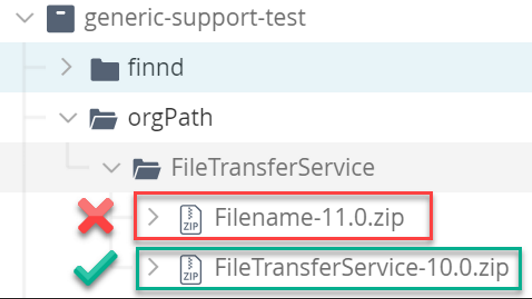
- The filename must also match the module:
:::figure
:::
As mentioned previously in this documentation the file has to have a dependency declaration for it to show in Octopus:
:::figure

:::
Once you have set this up you should then be able to search for the package in Octopus:
:::div{.warning}
The package search for the feed is case-sensitive, so you must match the package's case in the Package Name field exactly to find the package. A package name can be partially searched for, or the full package name and version can be searched for. For example, for a package called 'FileTransferService-10.0.zip,' you can search for 'File', 'FileTransferService', or 'FileTransferService-10.0.zip'.
:::
:::figure
:::
This example is based on the default `simple-layout` regex in Artifactory and so is not a definitive example. Other layouts will work as long as you ensure your feed is designed to match the regex you are using. We recommend using the `simple-layout` as it is the easiest one to set up and use. Please contact support@octopus.com if you are still struggling to see your packages in a search, and we will do our best to help.